
Enrollment
Enrolling as a bankVOD Consumer Requestor enables you to order verification services for personal bank accounts. This guide provides step-by-step instructions for completing the enrollment process. 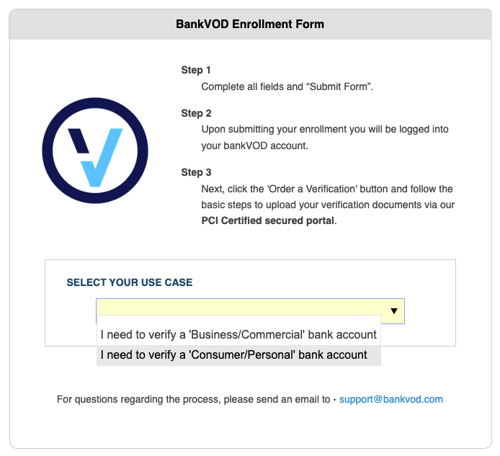
Step 1: Select Your Use Case
-
Go to the bankVOD enrollment page
-
Click the Account Type dropdown
-
Select: I need to verify a 'Consumer/Personal' bank account
Step 2: Complete Company Information
Company Details:
-
Company Name: Your business name (or personal name if no company)
-
Address: Street address, City, State, ZIP
-
Address 2: Suite/unit (optional)
-
Country: Defaults to United States
Contact Information:
-
Main Phone: Format (XXX) XXX-XXXX
-
Contact Name: First and Last name
-
Contact Email: CRITICAL - Primary account communication
-
Mobile Phone: Optional
Step 3: Enter Billing Address
-
Check Same as address above if billing matches company address
-
If different, complete separate billing address fields
Step 4: Tax Identification
-
Enter your EIN (Employer Identification Number) or TIN (Tax Identification Number)
Step 5: Choose Billing Option
Option 1: Monthly Invoicing
-
Receive monthly invoices
-
Payment due within 14 days of invoice date
Option 2: Credit Card Payment
-
Pay per transaction
-
Accepts: Visa, MasterCard, Discover, American Express
Step 6: Review and Submit
-
Read Terms and Conditions
-
Check: I ACCEPT THE TERMS AND CONDITIONS
-
Complete CAPTCHA verification
-
Click Submit Form
What's Next
After You Enroll:
-
Confirmation email sent to your contact email
-
Account setup processed
-
Login credentials provided
-
Ready to order verifications
Important Notes
-
All fields marked with asterisk (*) are required
-
Your contact email is where all notifications will be sent
-
Add bankVOD to your safe sender list
-
Keep your login credentials secure