.png?width=200&name=BankVOD_Veriv_Company_medium%20(1).png)
TRK Enrollment
TRK works with bankVOD to complete verifications for you. To set that up, you need your own bankVOD account. You create it in four steps, then send your account number to your TRK rep.
This guide provides step-by-step instructions for
-
Creating your account with bankVOD
-
Setup your invoice billing directly to your attention
-
Providing your account # & login email to your TRK rep.
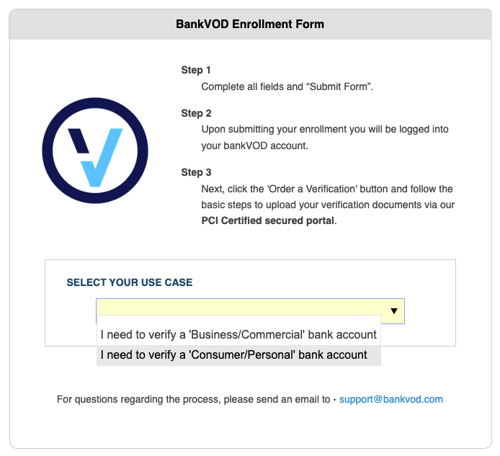
Step 1: Select Your Use Case
-
Click the Select Your Use Case dropdown
-
Select: I need to verify a 'Consumer/Personal' bank account
Step 2: Complete Company Information
Company Details:
-
Company Name: Your business name (or personal name if no company)
-
Address 1: Street address, City, State, ZIP
-
Address 2: Suite/unit (optional)
-
Country: Defaults to United States
Contact Information:
-
Main Phone: Format (XXX) XXX-XXXX
-
Contact Name: First and Last name
-
Contact Email: Primary account communication
-
Mobile Phone: Optional
Step 3: Enter Billing Address
-
Check "Same as address above" if billing matches company address
-
If different, complete separate billing address fields
Step 4: Tax Identification
-
Enter your EIN (Employer Identification Number) or TIN (Tax Identification Number)
Step 5: Choose Billing Option
Option 1: Monthly Invoicing
- Enroll only as an Invoiced customer, not by credit card
-
Receive monthly invoices
-
Payment due within 14 days of invoice date
Step 6: Review and Submit
-
Read Terms and Conditions
-
Check: I ACCEPT THE TERMS AND CONDITIONS
-
Complete CAPTCHA verification
-
Click Submit Form
Step 7: What's Next
After You Enroll:
-
Confirmation email is sent to your contact email
-
Account setup processed
-
Login credentials provided
-
Ready to order verifications
Step 8: Provide Account # to TRK
Find your account number. Sign in to bankVOD. Locate your account number on the home screen, at bankvod.com/MyAccount/profile.
ACTION: Send your account & email to your TRK rep.
Send your account number and your email address you used to enroll to your TRK representative.
Important Notes
-
All fields marked with asterisk (*) are required
-
Your contact email is where all notifications will be sent
-
Add bankVOD to your safe sender list
-
Keep your login credentials secure