
4506-C Orders
The 4506-C Orders page is a specialized section dedicated exclusively to managing IRS tax transcript verification requests. This page is separate from the standard "MY ORDERS" section and provides specific tools for tracking 4506-C (IRS Form 4506-C) and Social Security Number verification orders.
What is Form 4506-C? Form 4506-C is the IRS form used to request tax return transcripts for mortgage lending and other financial verification purposes. bankVOD processes these requests on behalf of lenders and mortgage professionals.
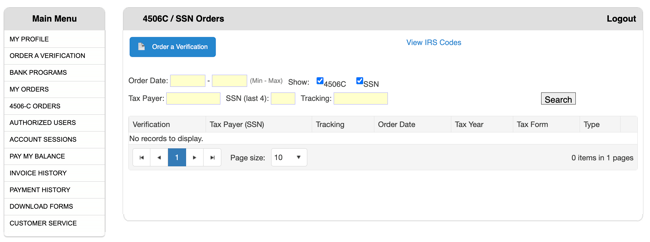
Search and Filter Tools
Use these specialized filters to find tax transcript orders:
Order Date Filter
- First Field: Start date (Min)
- Second Field: End date (Max)
- Enter dates to filter orders within a specific timeframe
Show Checkboxes (Order Type)
- 4506C - Display 4506-C tax transcript orders
- SSN - Display Social Security Number verifications
- Both checked by default to show all order types
- Uncheck either box to filter to specific order types only
Tax Payer Filter
- Search by taxpayer name (borrower name)
- Enter partial or full name
SSN (Last 4) Filter
- Enter last 4 digits of taxpayer's Social Security Number
- Useful for finding specific taxpayer when multiple people have similar names
Tracking Number Filter
- Search by your internal tracking/reference number
- Enter the tracking number assigned during order submission
Search Button
- Click after entering filter criteria to execute search
- Results update in the table below
- Combine multiple filters for precise searches
Understanding Order Status
Common Status Indicators:
- Submitted - Order received by bankVOD
- Processing - Request submitted to IRS
- Completed - Transcripts ready to download
- Requires Attention - Additional information needed
- IRS Delay - IRS processing backlog
- Not Found - IRS has no record (may indicate non-filing)
Downloading Tax Transcripts
When Status Shows "Completed":
- Locate your order in the list
- Click the Download link or button
- Save the PDF transcripts to your loan file