
Download Forms
The Download Forms page is your central repository for all PDF forms required to request and authorize verification services through bankVOD. Use this page to access authorization forms, request forms, and specialized documents needed for different verification types.
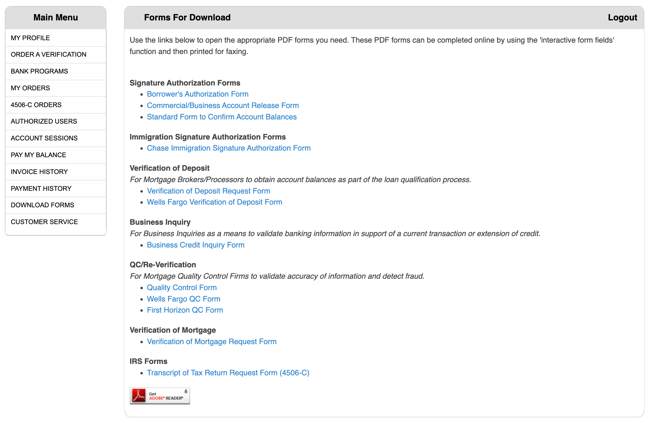
Key Functions
-
Access all required verification forms
-
Download PDF forms for completion
-
View forms organized by category
-
Complete forms using interactive PDF fields
-
Print forms for faxing or mailing
-
Obtain borrower authorization documents
Available Form Categories
1. Signature Authorization Forms
Purpose: Obtain borrower authorization for verification requests
Available Forms:
-
Borrower's Authorization Form
-
Commercial/Business Account Release Form
-
Standard Form to Confirm Account Balances
When to Use:
-
Required for most verification types
-
Authorizes release of financial information
-
Must be signed by borrower/account holder
-
Upload with verification order
2. Immigration Signature Authorization Forms
Purpose: Specialized forms for immigration-related verifications
Available Forms:
-
Chase Immigration Signature Authorization Form
When to Use:
-
Immigration loan applications
-
Bank-specific requirements
-
Chase account verifications for immigration
3. Verification of Deposit (VOD)
Purpose: Forms to verify account balances for mortgage qualification
Available Forms:
-
Verification of Deposit Request Form
-
Wells Fargo Verification of Deposit Form
When to Use:
-
Verifying deposit accounts
-
Confirming funds for closing
-
Bank-specific VOD requests
-
Alternative to online VOD ordering
4. Business Inquiry
Purpose: Validate banking information for business accounts and transactions
Available Forms:
-
Business Credit Inquiry Form
When to Use:
-
Business account verification
-
Commercial loan applications
-
Validating business banking relationships
5. QC/Re-Verification
Purpose: Quality control and fraud detection for mortgage firms
Available Forms:
-
Quality Control Form
-
Wells Fargo QC Form
-
First Horizon QC Form
When to Use:
-
Post-closing quality control
-
Fraud detection reviews
-
Re-verification of loan file information
-
Bank-specific QC requirements
6. Verification of Mortgage (VOM)
Purpose: Verify existing mortgage loan information
Available Forms:
-
Verification of Mortgage Request Form
When to Use:
-
Refinance transactions
-
Alternative to online VOM ordering
-
Servicer-specific requirements
-
Manual verification requests
7. IRS Forms
Purpose: Forms for requesting IRS tax transcripts
Available Forms:
-
Transcript of Tax Return Request Form (4506-C)
When to Use:
-
Requesting IRS tax transcripts
-
Income verification via tax returns
-
Required borrower authorization for IRS
-
Alternative to online 4506-C ordering
How to Download Forms
Step 1: Access Download Forms Page
-
Log in to bankVOD
-
Navigate to Download Forms from main menu
-
View list of available forms by category
Step 2: Select Form Category
-
Locate the category you need
-
Review available forms in that category
-
Identify the specific form required
Step 3: Download the Form
-
Click on form name or download link
-
PDF opens in new window/tab
-
Save to your computer
-
Or print directly if needed
Step 4: Complete the Form
For Interactive PDFs:
-
Type directly into form fields
-
Save completed form
-
Print or upload as needed
For Non-Interactive PDFs:
-
Print blank form
-
Complete by hand in ink
-
Or scan and fill digitally
Using Forms with bankVOD Orders
When Ordering Verifications:
Required Documents:
-
Download appropriate authorization form
-
Have borrower sign and date
-
Upload during order process
-
Ensure legible and complete
Form Completion Tips:
-
Fill out all required fields
-
Use borrower's legal name
-
Include all necessary account information
-
Sign and date appropriately
-
Scan clearly if uploading
Alternative to Online Ordering:
Some forms can be used to request verifications manually:
-
Download verification request form
-
Complete all fields
-
Attach authorization
-
Fax or email to bankVOD (if supported)
-
More time-consuming than online ordering
Form-Specific Guidelines
Authorization Forms:
Critical Requirements:
-
Borrower signature required
-
Date must be current
-
Legal name must match account records
-
Include all account holders if joint account
-
Clear and legible
Bank-Specific Forms:
When Required:
-
Some banks require their own forms
-
Use bank-specific form when available
-
Generic forms may be rejected
-
Check servicer/bank requirements
IRS Form 4506-C:
Special Instructions:
-
Must be signed by taxpayer
-
Requires specific tax years
-
Include complete address information
-
Must match IRS records exactly
-
Valid for limited time period