
Invoice History
The Invoice History page is your complete archive of all invoices generated for verification services ordered through bankVOD. Use this page to access billing statements, track charges, and maintain records for accounting purposes.
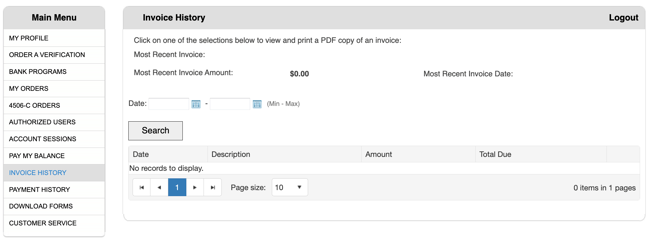
Key Functions
-
View complete invoice history
-
Access individual invoice PDFs
-
Track invoice dates and amounts
-
Search and filter invoices by date
-
Verify charges for verification services
-
Print invoices for accounting records
-
Support reconciliation with payments
Viewing Invoice History
Main Invoice List Shows:
-
Invoice date
-
Invoice number
-
Invoice amount
-
Total due at time of invoice
-
Link to detailed PDF documents
-
Billing period information
How to Access:
-
Navigate to Invoice History page
-
View list of all invoices chronologically
-
Click on invoice to view details
-
Download PDF for records
Searching for Invoices
Filter by Date Range:
-
Select start date (From)
-
Select end date (To)
-
Click Search to filter results
-
View invoices within specified timeframe
Common Searches:
-
Current month invoices
-
Previous quarter invoices
-
Specific date ranges
-
Year-end invoice compilation
Understanding Invoice Details
Invoice Header Information:
-
Invoice number (unique identifier)
-
Invoice date (when generated)
-
Due date (payment deadline)
-
Billing period covered
-
Total amount due
Itemized Charges:
-
Each verification service listed separately
-
Date of service
-
Verification type (VOM, Employment, VOD-S, etc.)
-
Individual charge amount
-
Borrower/tracking reference
Invoice Totals:
-
Subtotal of current charges
-
Previous balance (if applicable)
-
Total amount due
-
Payment terms
Downloading Invoices
To Download Invoice PDF:
-
Locate invoice in list
-
Click invoice number or PDF link
-
PDF opens in new window/tab
-
Save to your records
-
Print if needed for accounting
PDF Contents:
-
Complete invoice details
-
Itemized service breakdown
-
Company billing information
-
Payment instructions
-
Terms and conditions
Reconciling Invoices
Match Invoices to Orders:
-
Compare invoice line items to MY ORDERS
-
Verify each charge corresponds to completed order
-
Check dates align with order completion
-
Confirm pricing matches order confirmation
Match Invoices to Payments:
-
Review PAYMENT HISTORY
-
Confirm payment amounts and dates
-
Verify invoice marked as paid
-
Track remaining balance if partial payment
Monthly Reconciliation Process:
-
Download all invoices for the month
-
Match to completed orders in MY ORDERS
-
Verify all charges accurate
-
Check payments applied correctly
-
Note any discrepancies
-
Contact support if issues found
Critical Actions
1. Review Promptly
-
Check new invoices within 24 hours of receipt
-
Verify charges are accurate
-
Note due dates
2. Verify Charges
-
Match invoice items to MY ORDERS
-
Confirm verification types correct
-
Check pricing matches expectations
-
Identify any unexpected charges
3. Save PDFs
-
Download and archive all invoices
-
Maintain organized filing system
-
Keep for accounting records
-
Required for audit purposes
4. Cross-Reference
-
Compare to PAYMENT HISTORY
-
Verify payments applied correctly
-
Track outstanding balances
-
Monitor account status
5. Pay Timely
-
Use PAY MY BALANCE before due date
-
Avoid late fees
-
Maintain good account standing
-
Process payment early during busy periods
6. Reconcile Monthly
-
Match orders to invoices to payments
-
Complete full accounting cycle
-
Identify and resolve discrepancies
-
Maintain accurate records