
My Profile
The My Profile section is your personal account dashboard where you can view and manage your contact information, monitor your account balance, update payment methods, and access quick actions for ordering verifications. 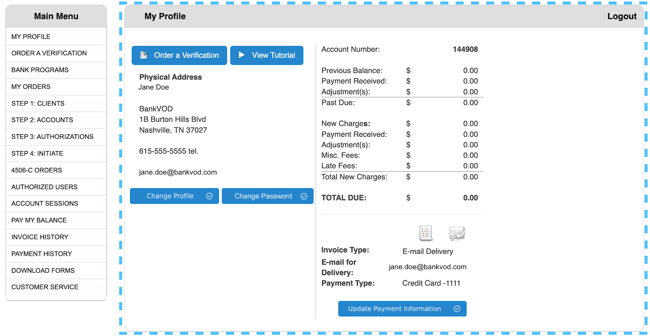
Quick Action: Order a Verification
-
Click the blue "Order a Verification" button
-
Complete the order form with required information
-
Submit your verification request
View Your Physical Address
Your registered mailing address displays:
-
Contact name
-
Company name (if applicable)
-
Street address
-
City, State, ZIP code
-
Phone number
-
Email address
Note: This address is used for physical correspondence and emergency contact purposes.
Update Your Profile Information
Change Profile:
-
Click "Change Profile" button
-
Update any information:
-
Contact name
-
Company name
-
Physical mailing address
-
Phone number
-
Email address
-
Notification preferences
-
-
Review your changes
-
Click Save or Update
-
Confirmation message appears
Important: Your email address is used for invoice delivery and system notifications. Keep it current and monitored.
Change Your Password
-
Click "Change Password" button
-
Enter current password for verification
-
Enter new password
-
Must be 8+ characters with letters, numbers, and symbols
-
-
Re-enter new password to confirm
-
Click Save or Update
-
Confirmation message appears
Security Tip: Change your password regularly and use a unique password not used on other websites.
Manage Invoice Delivery
Current Setting Display:
-
Shows delivery method (E-mail or Mail Delivery)
-
Shows email address for invoice delivery
To Change:
-
Click "Change Profile"
-
Locate Invoice Delivery section
-
Select preferred method:
-
E-mail Delivery (instant, environmentally friendly)
-
Mail Delivery (physical copy to registered address)
-
-
If selecting E-mail, confirm or update email address
-
Save your changes
Update Payment Information
Current Display:
-
Shows payment method on file (e.g., "Credit Card -1111" with last 4 digits)
To Update:
-
Click "Update Payment Information" button
-
Enter or update payment details:
-
Credit card number
-
Expiration date
-
CVV security code
-
Billing ZIP code
-
Cardholder name
-
-
Review information
-
Click Save or Update
-
Confirm updated last 4 digits appear
Security Note: Only the last 4 digits display for identification. All payment information is encrypted and PCI DSS compliant.
Monitor Your Account Balance
When to Check:
-
Before ordering new verifications
-
After making payments
-
When reviewing monthly invoices
-
If you receive a past due notification
Understanding Balance Alerts:
Positive Balance ($0.01 or more):
-
You have outstanding charges
-
Make a payment by clicking PAY MY BALANCE from the Main Menu
Zero Balance ($0.00):
-
Your account is current with no outstanding charges