
Payment History
The Payment History page is your complete archive of all payments made to bankVOD for verification services. Use this page to view transaction records, download payment receipts, track your account balance, and export data for accounting purposes.
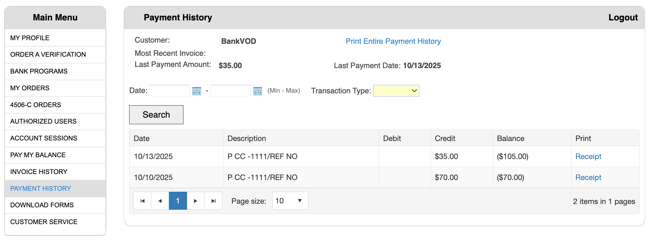
Key Functions
-
View complete payment transaction history
-
Track payment dates and amounts
-
Monitor running account balance
-
Download individual payment receipts
-
Print entire payment history report
-
Export to Excel for accounting
-
Search and filter transactions
-
Reconcile with statements
Viewing Payment History
Main Payment List Shows:
-
Payment date
-
Payment amount
-
Payment method (credit card, ACH)
-
Last 4 digits of card used
-
Transaction reference number
-
Running account balance after each payment
-
Link to detailed receipt
How to Access:
-
Navigate to Payment History page
-
View chronological list of all payments
-
See running balance calculations
-
Click on payment for detailed receipt
Searching for Payments
Filter Options:
-
Search by date range (From/To dates)
-
Filter by payment method
-
Search by amount
-
Look up by transaction reference number
Common Searches:
-
Current month payments
-
Specific payment date
-
Year-end payment totals
-
Credit card reconciliation
Understanding Payment Details
Payment Receipt Information:
-
Payment date and time
-
Amount paid
-
Payment method used
-
Transaction confirmation number
-
Account balance before payment
-
Account balance after payment
-
List of orders/invoices paid
Order Breakdown:
Each receipt shows which orders were paid:
-
Order date
-
Verification type
-
Borrower name
-
Order amount
-
Order reference/tracking number
Downloading Payment Receipts
To Download Individual Receipt:
-
Locate payment in list
-
Click receipt link or download button
-
PDF opens in new window
-
Save to your records
-
Print if needed
Receipt Uses:
-
Accounting records
-
Expense tracking
-
Tax documentation
-
Audit compliance
-
Credit card reconciliation
Printing Payment History
To Print Complete History:
-
Click Print History button
-
Select date range if desired
-
Formatted report generates
-
Print or save as PDF
Report Contents:
-
All payments in date range
-
Payment amounts and methods
-
Running balance
-
Total payments summary
-
Formatted for professional records
Exporting to Excel
To Export Payment Data:
-
Click Export to Excel button
-
Select date range
-
Download Excel file
-
Open in spreadsheet program
Excel File Includes:
-
Payment dates
-
Payment amounts
-
Payment methods
-
Transaction numbers
-
Running balances
-
All searchable and sortable data
Use Excel Export For:
-
Accounting software import
-
Budget tracking
-
Monthly reconciliation
-
Year-end reporting
-
Cost analysis by period
-
Department allocation
Reconciling Payments
Match to Credit Card Statements:
-
Download payment history for statement period
-
Compare dates and amounts
-
Verify last 4 digits of card match
-
Check transaction reference numbers
-
Note any discrepancies
Match to Invoice History:
-
Compare payment dates to invoice dates
-
Verify payment amounts cover invoices
-
Track which invoices each payment satisfied
-
Confirm balance reductions accurate
-
Identify any unapplied payments
Monthly Reconciliation Process:
-
Export payment history for month
-
Download invoice history for same period
-
Match payments to invoices
-
Verify account balance correct
-
Document any discrepancies
-
Contact support if issues found
Understanding Running Balance
How Balance is Calculated:
-
Starting balance (previous outstanding)
-
Plus: New charges from invoices
-
Minus: Payments made
-
Equals: Current balance
Balance Notes:
-
Balance shown after each transaction
-
Negative balance = credit on account
-
Positive balance = amount owed
-
Zero balance = account current
Critical Actions
1. Regular Review
-
Check Payment History weekly or monthly
-
Verify all payments recorded correctly
-
Monitor account balance trends
-
Identify any missing payments
2. Download Receipts
-
Save receipt for every payment made
-
Organize by date or transaction number
-
Keep in accounting files
-
Required for audit documentation
3. Export to Excel
-
Download monthly for accounting records
-
Import into accounting software if needed
-
Track verification costs over time
-
Analyze spending patterns
4. Reconcile Statements
-
Match to credit card statements monthly
-
Verify ACH payments in bank statements
-
Confirm all payments processed correctly
-
Report any discrepancies immediately
5. Maintain Archives
-
Keep payment records for 7 years minimum
-
Required for tax purposes
-
Needed for audits
-
Support for expense claims
6. Document Discrepancies
-
Note any payment issues immediately
-
Contact bankVOD support promptly
-
Provide transaction reference numbers
-
Keep records of resolution