
4506-C Orders
The 4506-C Orders page allows you to order IRS tax transcript verifications for individuals or entities. This service retrieves official tax return information directly from the IRS, commonly used for income verification, loan applications, mortgage processing, and financial due diligence.
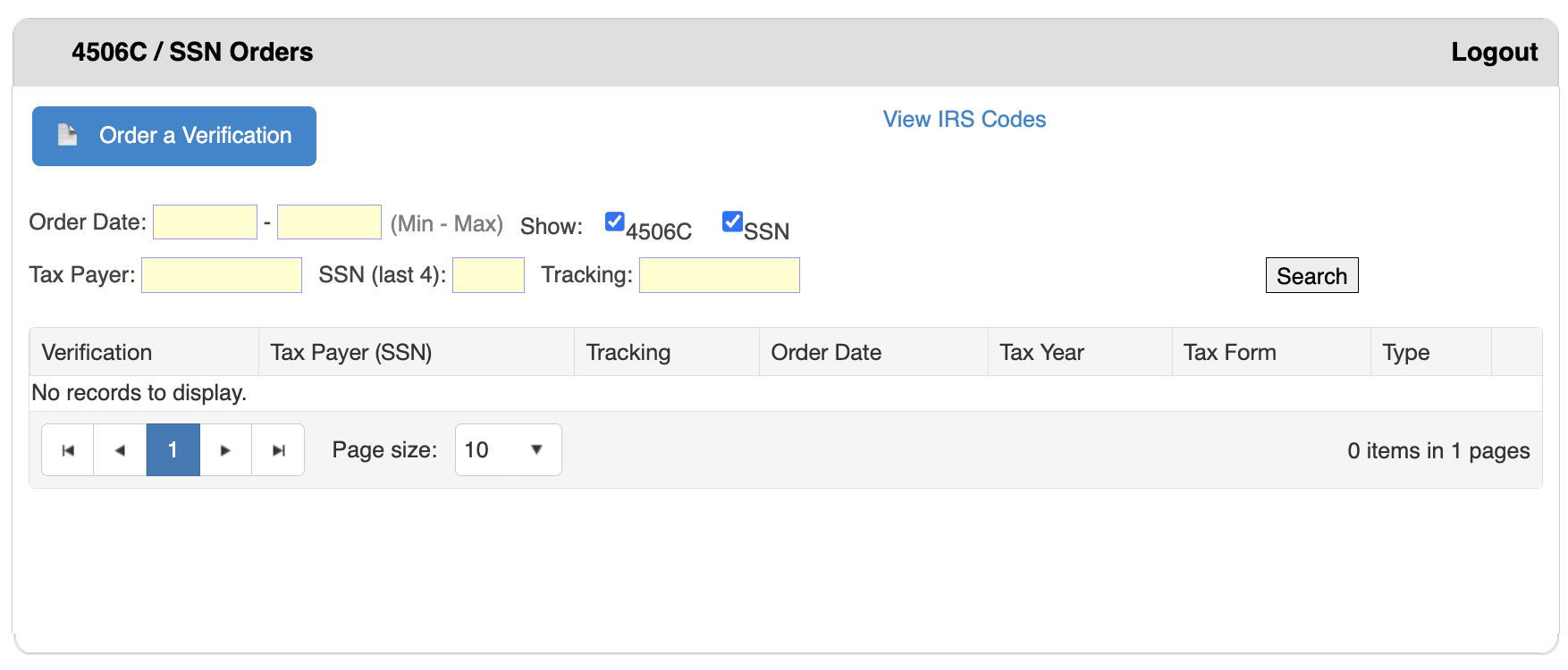
Step 1: Start a New Order
- Log in to bankVOD
- Select "4506-C Orders" from the Main Menu
- Click the blue "Order a Verification" button
Step 2: Select Verification Type
Use the checkboxes in the "Show:" section to select which verification(s) you need:
- 4506C - Check this to order IRS tax return transcripts
- SSN - Check this to order Social Security Number verification
- You can select both checkboxes to order both types simultaneously
Note: Both boxes are checked by default in the system.
Step 3: Complete the Order Form
Required Information:
- Taxpayer name (individual or entity)
- Social Security Number or Employer Identification Number (EIN)
- Current address
- Tax years requested
- Taxpayer signature authorization
- Tax form type (1040, 1120, 1065, 1041, etc.)
Step 4: Submit Your Order
- Review all information for accuracy
- Click Submit to place your order
- Note your tracking number for future reference
- Save confirmation details
Searching for Existing Orders
Use the search filters to find and review previously submitted orders:
Order Date:
- Enter a date range to filter orders by submission date
- Leave blank to search all dates
Tax Payer:
- Enter the taxpayer's name
- Type name exactly as it appears in your records
SSN (last 4):
- Enter the last four digits of the Social Security Number
- Privacy-conscious way to search
Tracking:
- Enter the unique tracking number for precise order lookup
To Execute Search:
- Enter your search criteria
- Click the "Search" button
- Review results in the table below
Understanding Results Table
After searching, orders appear in a table with these columns:
Verification:
- Shows verification type ordered
- Displays verification status or reference number
- Click to view detailed results
Tax Payer (SSN):
- Name of the individual or entity
- May include full or masked SSN
Tracking:
- Unique tracking number assigned to the order
- Use for reference and follow-up
Order Date:
- Date the verification was ordered
- Helps track processing timelines
Tax Year:
- The tax year(s) requested
- May show multiple years (e.g., "2022, 2023")
Tax Form:
- Specific IRS form requested
- Common forms: 1040, 1120, 1065, 1041
Type:
- Indicates verification type: 4506-C, SSN, or both