
My Profile
My Profile is your account dashboard where you can view account information, access quick actions, manage your profile settings, monitor your account balance, and configure payment preferences.
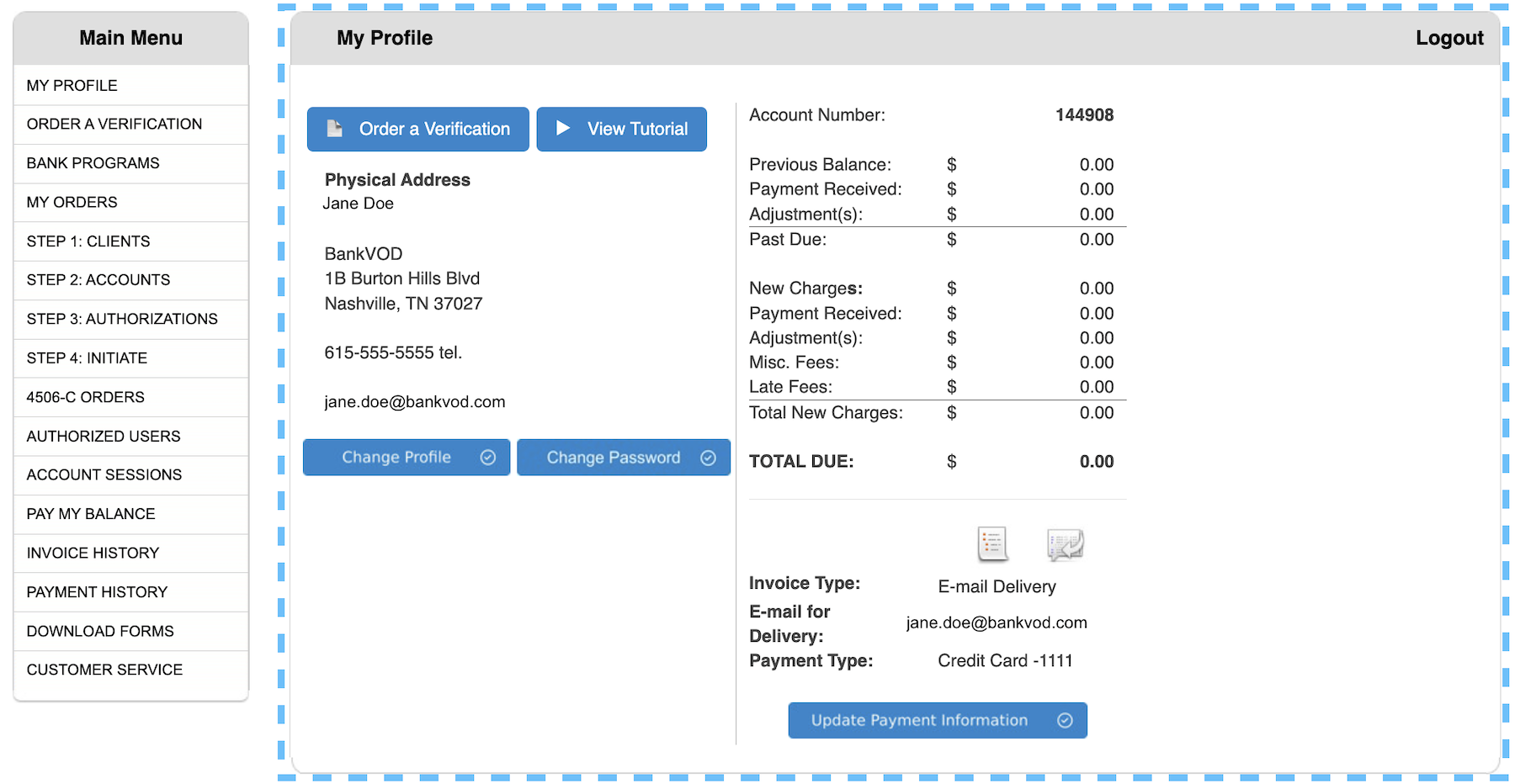
The My Profile page contains:
-
Quick action buttons to start orders and access tutorials
-
Your registered business address and contact information
-
Your unique account number
-
Account balance summary with current charges and payment status
-
Invoice and payment settings
Quick Actions
Two buttons at the top of your profile provide immediate access to key functions.
Order a Verification
-
Starts a new verification request immediately
-
Same function as ORDER A VERIFICATION from Main Menu
View Tutorial
-
Access instructional videos
-
Learn how to use the platform
-
Available anytime from your profile
Profile Management
Your Business Information
View your registered details:
-
Business name
-
Street address
-
City, State, ZIP
-
Phone number
-
Email address
How to Update Information
Change Profile:
-
Click "Change Profile" button
-
Update business address
-
Update contact information
-
Save changes
Change Password:
-
Click "Change Password" button
-
Enter current password
-
Enter new password
-
Confirm new password
-
Save changes
Account Number
Your unique account identifier appears at the top right of your profile page.
Use this number when:
-
Contacting bankVOD support
-
Referencing your account
-
Processing payments
Account Balance Summary
Your profile displays a comprehensive financial snapshot:
Previous Balance
-
Outstanding amount from prior invoices
-
Amount carried forward from last billing cycle
Payment Received
-
Recent payments applied to your account
-
Credits from processed payments
Adjustment(s)
-
Any credits applied to account
-
Adjustments made by bankVOD
Past Due
-
Overdue amounts requiring immediate attention
-
Amounts from previous billing cycles
New Charges
-
Current period charges
-
Recent verification orders
Misc. Fees
-
Additional service fees
-
Special handling charges
Late Fees
-
Penalties for overdue payments
-
Applied when payments miss due date
Total Due
-
Your current account balance
-
Sum of all charges minus payments
Invoice & Payment Settings
Located in the bottom right of your profile, these settings control how you receive invoices and make payments.
Note: Invoice payment is not available for all users.
Invoice Type
Choose how you receive invoices:
Paper:
-
Invoices mailed to business address
-
Printed statements
-
Traditional mail delivery
E-mail Delivery:
-
Paperless billing
-
Invoices sent electronically
-
Immediate delivery to inbox
E-mail for Delivery
If you select E-mail Delivery:
-
Enter the email address for invoices
-
Ensure email is monitored regularly
-
Add bankVOD to safe sender list
-
Can be different from account email
Payment Type
Select your payment method:
Check:
-
Pay by mailed check
-
Send to address on invoice
-
Include account number on check
-
Allow time for mail processing
Credit Card:
-
Pay by credit card on file
-
Charges processed automatically
-
Immediate payment processing
-
Update card information as needed
How to Update Settings
-
Locate Invoice & Payment Settings section
-
Click to select new preferences
-
Enter any required information
-
Click "Update Payment Information" button
-
Confirm changes saved