
Pay My Balance
The Pay My Balance page allows you to view your account balance and make payments for bankVOD verification services. You can pay outstanding invoices using either a credit card or ACH (Automated Clearing House) bank transfer.
Note: Invoice payment is not available for all users.
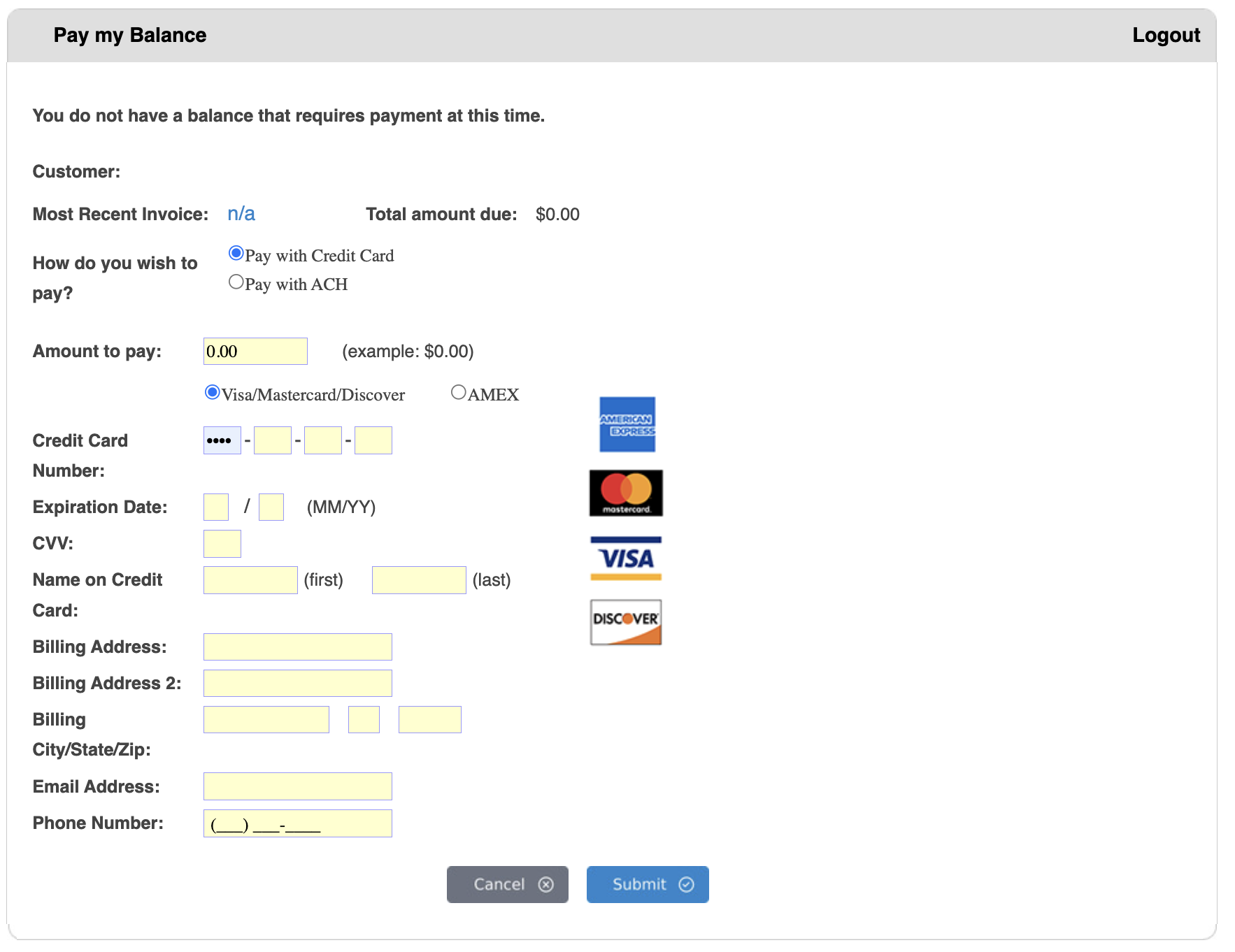
Understanding Your Account Status
Account Information Displayed:
- Customer Name - Your registered account name
- Most Recent Invoice - Your latest invoice number (or "n/a" if no recent invoice)
- Total Amount Due - Current outstanding balance
Zero Balance Status:
If you see the message: "You do not have a balance that requires payment at this time."
- Your account is current with no outstanding balance
- Total amount due shows $0.00
- You can still make advance payments if desired
- No immediate action required
Outstanding Balance:
If you have an amount due:
- The total will be displayed in the "Total amount due" field
- You should proceed with payment to maintain account standing
- Late payments may affect service access
Payment Methods
Option 1: Pay with Credit Card (Default)
- Accepts Visa, Mastercard, Discover, and American Express
- Payment processes immediately
- Receipt sent to your email address
- Most common payment method
Option 2: Pay with ACH
- Direct bank account transfer
- May take 2-3 business days to process
- Lower processing fees
- Requires bank account information
- Good option for recurring or larger payments
Making a Credit Card Payment
Step 1: Select Payment Method
- Ensure "Pay with Credit Card" radio button is selected (this is the default)
- The credit card payment form will be displayed
Step 2: Enter Payment Amount
- Enter the amount you wish to pay in the "Amount to pay" field
- Format: 0.00 (no dollar sign needed)
- Can pay full balance or partial amount
- For zero balance accounts, enter any amount for advance payment
Step 3: Select Card Type
Choose your credit card type:
- Visa/Mastercard/Discover (first radio button - default)
- AMEX (American Express - second radio button)
Step 4: Enter Credit Card Information
Credit Card Number:
- Enter your 16-digit card number (15 digits for AMEX)
- Format: Four sections separated by dashes
- First section appears as dots (••••) for security
- Do not include spaces
Expiration Date:
- Enter month in first field (MM)
- Enter year in second field (YY)
- Format: MM/YY
CVV (Card Verification Value):
- Enter 3-digit security code (4 digits for AMEX)
- Located on back of card (front for AMEX)
- Required for security verification
- Not stored after transaction
Name on Credit Card:
- First Name - Enter cardholder's first name exactly as it appears on card
- Last Name - Enter cardholder's last name exactly as it appears on card
- Must match card exactly for processing
Step 5: Enter Billing Information
Billing Address:
- Enter street address line 1 associated with the credit card
- Must match the address on file with your card issuer
- Required for card verification
Billing Address 2:
- Optional field for apartment, suite, or unit number
- Leave blank if not applicable
Billing City/State/Zip:
- City - Enter billing city
- State - Enter two-letter state code
- Zip - Enter 5-digit ZIP code
- All three fields required
- Must match credit card billing address
Step 6: Confirm Contact Information
Email Address:
- Pre-filled with your account email
- Payment receipt will be sent to this address
Phone Number:
- Enter phone number with area code
- Format: (__) -_
- Used for payment verification if needed
- Optional but recommended
Step 7: Submit Payment
- Review all information carefully
- Verify the payment amount is correct
- Ensure all required fields are completed
- Click the blue "Submit" button to process payment
- Click "Cancel" button to abort and return without processing
Making an ACH Payment
Step 1: Select Payment Method
- Select the "Pay with ACH" radio button
- The payment form will update to show ACH-specific fields
Step 2: Enter Payment Amount
- Enter the amount you wish to pay
- Same format as credit card payments (example: 0.00)
- ACH is often used for larger amounts due to lower fees
Step 3: Complete ACH Information
Required Information:
ACH form fields will replace credit card fields when ACH is selected. Typical fields include:
- Bank name
- Routing number (9 digits)
- Account number
- Account type (Checking or Savings)
- Account holder name
- Billing address
- Email and phone contact
Note: ACH payments typically take 2-3 business days to process and clear.
Step 4: Submit Payment
- Review all information carefully
- Click "Submit" to process
- You'll receive confirmation via email
- Payment will be withdrawn from your bank account within 2-3 business days