
Invoice History
The Invoice History page provides access to all invoices generated for your bankVOD account. You can view, search, and download PDF copies of invoices for record-keeping, accounting, expense reporting, and payment verification.
Note: Invoice payment is not available for all users.
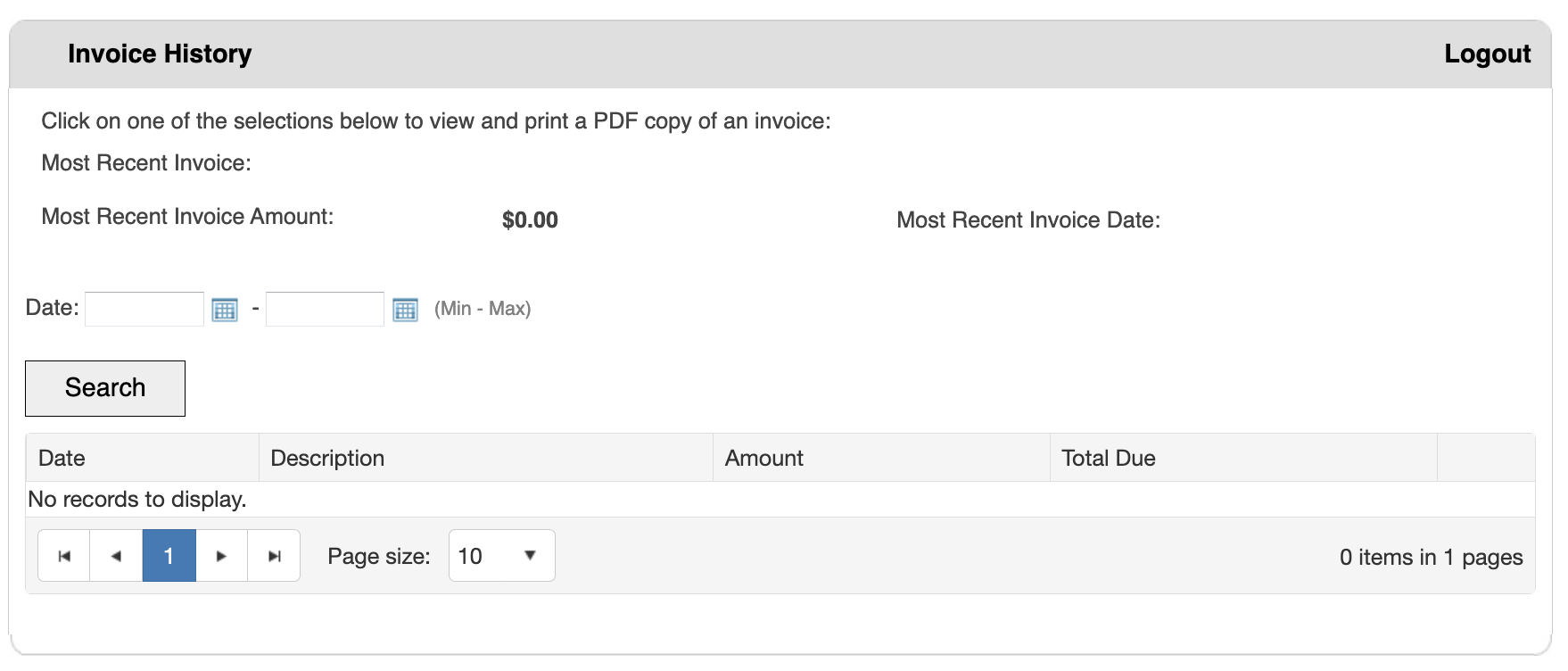
Step 1: Access Invoice History
- Log in to your bankVOD account
- Navigate to Invoice History from the menu
Step 2: Search for Invoices (Optional)
Using Date Range Filter:
- Click in the first date field (Min)
- Enter start date or use calendar picker
- Click in the second date field (Max)
- Enter end date or use calendar picker
- Click Search button
Step 3: Review Invoice Table
The table displays:
- Date: When invoice was generated
- Description: Invoice number or billing period
- Amount: Total invoice amount
- Total Due: Current outstanding balance ($0.00 if paid)
Step 4: View/Download Invoice PDF
- Locate the invoice in the table
- Click anywhere on the invoice row
- PDF will either: Open in new browser window or download to your Downloads folder
Step 5: Print or Save Invoice (Optional)
To Print:
- Open invoice PDF
- Press Ctrl+P (or Cmd+P)
- Select printer settings
- Click Print
To Save:
- Download PDF
- Rename with clear naming convention • Example: "bankVOD_Invoice_2025-10_12345.pdf"
- Save to organized folder structure